service
=========

 Add custom services to your Linux system.
Example Playbook
----------------
This example is taken from `molecule/resources/playbook.yml`:
```yaml
---
- name: Converge
hosts: all
become: yes
gather_facts: yes
vars:
service_list:
- name: simple-service
description: Simple Service
start_command: /usr/bin/sleep 3600
- name: forking-service
description: Forking Service
type: forking
start_command: "/usr/bin/sleep 7200 &"
- name: specific-stop-service
description: Specific Stop Service
start_command: /usr/bin/sleep 14400
stop_command: killall -f "sleep 1440"
- name: specific-user-group-service
description: Specific User Group Service
start_command: /usr/bin/sleep 28800
user_name: root
group_name: root
- name: specific-workingdirectory-service
description: Specific WorkingDirectory Service
start_command: /usr/bin/sleep 57600
working_directory: /tmp
- name: specific-pattern-service
description: Specific Status Pattern Service
start_command: /usr/bin/sleep 115200
status_pattern: 115200
roles:
- robertdebock.service
```
The machine you are running this on, may need to be prepared.
```yaml
---
- name: Prepare
hosts: all
gather_facts: no
become: yes
serial: 30%
roles:
- role: robertdebock.bootstrap
```
Also see a [full explanation and example](https://robertdebock.nl/how-to-use-these-roles.html) on how to use these roles.
Role Variables
--------------
These variables are set in `defaults/main.yml`:
```yaml
---
# defaults file for service
# status_list can contain a list of services to add to the system.
# The mandatory items for each item are:
# - name: The (short) name of the service, i.e. "tomcat".
# - description: A bit longer name, i.e. "Tomcat application server".
# - start_command: The command to start the daemon,
# i.e. "/usr/local/bin/java -jar some.jar"
# The optional items are:
# - stop_command: By default the program that is started is found and stopped.
# in case a running program is renamed or expanded (including a path) during
# startup, you can specify a custom stop command here, i.e. "pkill foo"
# - status_pattern: What program (or pattern) to look for when finding the
# status of a program, i.e. "artifactory".
# - type: How the program starts; "simple" or "forking". Simple means the
# program runs on the foreground, i.e. "nc -l 1234". Forking means the
# program itself forks, i.e. "nc -l 12345 &"
# - working_directory: The directory to cd into before starting the service.
```
Requirements
------------
- Access to a repository containing packages, likely on the internet.
- A recent version of Ansible. (Tests run on the current, previous and next release of Ansible.)
The following roles can be installed to ensure all requirements are met, using `ansible-galaxy install -r requirements.yml`:
```yaml
---
- robertdebock.bootstrap
```
Context
-------
This role is a part of many compatible roles. Have a look at [the documentation of these roles](https://robertdebock.nl/) for further information.
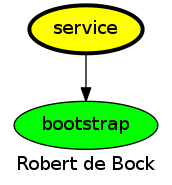
Here is an overview of related roles:
Compatibility
-------------
This role has been tested against the following distributions and Ansible version:
|distribution|ansible 2.7|ansible 2.8|ansible devel|
|------------|-----------|-----------|-------------|
|alpine-edge*|no|yes|yes*|
|alpine-latest|no|yes|yes*|
|archlinux|no|yes|yes*|
|centos-6|no|yes|yes*|
|centos-latest|no|yes|yes*|
|debian-stable|no|yes|yes*|
|debian-unstable*|no|yes|yes*|
|fedora-latest|no|yes|yes*|
|fedora-rawhide*|no|yes|yes*|
|opensuse-leap|no|yes|yes*|
|ubuntu-devel*|no|yes|yes*|
|ubuntu-latest|no|yes|yes*|
|ubuntu-rolling|no|yes|yes*|
A single star means the build may fail, it's marked as an experimental build.
Testing
-------
[Unit tests](https://travis-ci.org/robertdebock/ansible-role-service) are done on every commit and periodically.
If you find issues, please register them in [GitHub](https://github.com/robertdebock/ansible-role-service/issues)
To test this role locally please use [Molecule](https://github.com/ansible/molecule):
```
pip install molecule
molecule test
```
To test on Amazon EC2, configure [~/.aws/credentials](https://docs.aws.amazon.com/sdk-for-java/v1/developer-guide/credentials.html) and set a region using `export AWS_REGION=eu-central-1` before running `molecule test --scenario-name ec2`.
There are many specific scenarios available, please have a look in the `molecule/` directory.
License
-------
Apache-2.0
Author Information
------------------
[Robert de Bock](https://robertdebock.nl/)
Add custom services to your Linux system.
Example Playbook
----------------
This example is taken from `molecule/resources/playbook.yml`:
```yaml
---
- name: Converge
hosts: all
become: yes
gather_facts: yes
vars:
service_list:
- name: simple-service
description: Simple Service
start_command: /usr/bin/sleep 3600
- name: forking-service
description: Forking Service
type: forking
start_command: "/usr/bin/sleep 7200 &"
- name: specific-stop-service
description: Specific Stop Service
start_command: /usr/bin/sleep 14400
stop_command: killall -f "sleep 1440"
- name: specific-user-group-service
description: Specific User Group Service
start_command: /usr/bin/sleep 28800
user_name: root
group_name: root
- name: specific-workingdirectory-service
description: Specific WorkingDirectory Service
start_command: /usr/bin/sleep 57600
working_directory: /tmp
- name: specific-pattern-service
description: Specific Status Pattern Service
start_command: /usr/bin/sleep 115200
status_pattern: 115200
roles:
- robertdebock.service
```
The machine you are running this on, may need to be prepared.
```yaml
---
- name: Prepare
hosts: all
gather_facts: no
become: yes
serial: 30%
roles:
- role: robertdebock.bootstrap
```
Also see a [full explanation and example](https://robertdebock.nl/how-to-use-these-roles.html) on how to use these roles.
Role Variables
--------------
These variables are set in `defaults/main.yml`:
```yaml
---
# defaults file for service
# status_list can contain a list of services to add to the system.
# The mandatory items for each item are:
# - name: The (short) name of the service, i.e. "tomcat".
# - description: A bit longer name, i.e. "Tomcat application server".
# - start_command: The command to start the daemon,
# i.e. "/usr/local/bin/java -jar some.jar"
# The optional items are:
# - stop_command: By default the program that is started is found and stopped.
# in case a running program is renamed or expanded (including a path) during
# startup, you can specify a custom stop command here, i.e. "pkill foo"
# - status_pattern: What program (or pattern) to look for when finding the
# status of a program, i.e. "artifactory".
# - type: How the program starts; "simple" or "forking". Simple means the
# program runs on the foreground, i.e. "nc -l 1234". Forking means the
# program itself forks, i.e. "nc -l 12345 &"
# - working_directory: The directory to cd into before starting the service.
```
Requirements
------------
- Access to a repository containing packages, likely on the internet.
- A recent version of Ansible. (Tests run on the current, previous and next release of Ansible.)
The following roles can be installed to ensure all requirements are met, using `ansible-galaxy install -r requirements.yml`:
```yaml
---
- robertdebock.bootstrap
```
Context
-------
This role is a part of many compatible roles. Have a look at [the documentation of these roles](https://robertdebock.nl/) for further information.
Here is an overview of related roles:

Compatibility
-------------
This role has been tested against the following distributions and Ansible version:
|distribution|ansible 2.7|ansible 2.8|ansible devel|
|------------|-----------|-----------|-------------|
|alpine-edge*|no|yes|yes*|
|alpine-latest|no|yes|yes*|
|archlinux|no|yes|yes*|
|centos-6|no|yes|yes*|
|centos-latest|no|yes|yes*|
|debian-stable|no|yes|yes*|
|debian-unstable*|no|yes|yes*|
|fedora-latest|no|yes|yes*|
|fedora-rawhide*|no|yes|yes*|
|opensuse-leap|no|yes|yes*|
|ubuntu-devel*|no|yes|yes*|
|ubuntu-latest|no|yes|yes*|
|ubuntu-rolling|no|yes|yes*|
A single star means the build may fail, it's marked as an experimental build.
Testing
-------
[Unit tests](https://travis-ci.org/robertdebock/ansible-role-service) are done on every commit and periodically.
If you find issues, please register them in [GitHub](https://github.com/robertdebock/ansible-role-service/issues)
To test this role locally please use [Molecule](https://github.com/ansible/molecule):
```
pip install molecule
molecule test
```
To test on Amazon EC2, configure [~/.aws/credentials](https://docs.aws.amazon.com/sdk-for-java/v1/developer-guide/credentials.html) and set a region using `export AWS_REGION=eu-central-1` before running `molecule test --scenario-name ec2`.
There are many specific scenarios available, please have a look in the `molecule/` directory.
License
-------
Apache-2.0
Author Information
------------------
[Robert de Bock](https://robertdebock.nl/)