users
=========

 The purpose of this role is to add users and groups on your system.
Example Playbook
----------------
This example is taken from `molecule/resources/playbook.yml`:
```yaml
---
- name: Converge
hosts: all
become: yes
gather_facts: yes
vars:
users_group_list:
- name: robertdb
gid: 1024
- name: users
- name: notgroup
state: absent
users_user_list:
- name: root
cron_allow: yes
- name: robertdb
comment: Robert de Bock
uid: 1024
group: robertdb
groups: users
cron_allow: yes
sudo_options: "ALL=(ALL) NOPASSWD: ALL"
authorized_key: "ssh-rsa ABC123"
- name: notuser
state: absent
- name: keyuser
manage_ssh_key: yes
- name: privkeyuser
manage_ssh_key: yes
copy_private_key: yes
- name: multiplekeys
authorized_keys:
- "ssh-rsa ABC1234"
- "ssh-rsa ABC12345"
- name: mixedkeys
authorized_key: "ssh-rsa ABC123456"
authorized_keys:
- "ssh-rsa ABC1234567"
- "ssh-rsa ABC12345678"
roles:
- robertdebock.users
```
The machine you are running this on, may need to be prepared.
```yaml
---
- name: Prepare
hosts: all
gather_facts: no
become: yes
roles:
- robertdebock.bootstrap
```
Also see a [full explanation and example](https://robertdebock.nl/how-to-use-these-roles.html) on how to use these roles.
Role Variables
--------------
These variables are set in `defaults/main.yml`:
```yaml
---
# defaults file for users
# The location to store ssh keys for user
users_ssh_key_directory: ssh_keys
# The default shell if not overwritten.
users_shell: /bin/bash
# manage cron permissions via /etc/cron.allow
users_cron_allow: true
# A list of groups and properties.
# users_group_list:
# - name: robertdb
# gid: 1024
# - name: notgroup
# state: absent
# A list of users and properties.
# users_user_list:
# - name: root
# cron_allow: yes
# - name: robertdb
# comment: Robert de Bock
# uid: 1024
# group: robertdb
# groups: users,wheel
# cron_allow: yes
# sudo_options: "ALL=(ALL) NOPASSWD: ALL"
# authorized_key: "ssh-rsa AAAAB3NzaC1yc2EAAAADAQABAAABAQCWswOogkZz/ihQA0lENCwDwSzmtmBWtFwzIzDlfa+eb4rBt6rZBg7enKeMqYtStI/NDneBwZUFBDIMu5zJTbvg7A60/WDhWXZmU21tZnm8K7KREFYOUndc6h//QHig6IIaIwwBZHF1NgXLtZ0qrUUlNU5JSEhDJsObMlPHtE4vFP8twPnfc7hxAnYma5+knU6qTMCDvhBE5tGJdor4UGeAhu+SwSVDloYtt1vGTmnFn8M/OD/fRMksusPefxyshJ37jpB4jY/Z9vzaNHwcj33prwl1b/xRfxr/+KRJsyq+ZKs9u2TVw9g4p+XLdfDtzZ8thR2P3x3MFrZOdFmCbo/5"
# authorized_keys:
# - "ssh-rsa AAAAB3NzaC1yc2EAAAADAQABAAABAQCWswOogkZz/ihQA0lENCwDwSzmtmBWtFwzIzDlfa+eb4rBt6rZBg7enKeMqYtStI/NDneBwZUFBDIMu5zJTbvg7A60/WDhWXZmU21tZnm8K7KREFYOUndc6h//QHig6IIaIwwBZHF1NgXLtZ0qrUUlNU5JSEhDJsObMlPHtE4vFP8twPnfc7hxAnYma5+knU6qTMCDvhBE5tGJdor4UGeAhu+SwSVDloYtt1vGTmnFn8M/OD/fRMksusPefxyshJ37jpB4jY/Z9vzaNHwcj33prwl1b/xRfxr/+KRJsyq+ZKs9u2TVw9g4p+XLdfDtzZ8thR2P3x3MFrZOdFmCbo/5"
# copy_private_key: yes
# - name: notuser
# state: absent
# - name: keyuser
# manage_ssh_key: yes
# - name: specificshell
# shell: "/bin/ksh"
```
Requirements
------------
- Access to a repository containing packages, likely on the internet.
- A recent version of Ansible. (Tests run on the current, previous and next release of Ansible.)
The following roles can be installed to ensure all requirements are met, using `ansible-galaxy install -r requirements.yml`:
```yaml
---
- robertdebock.bootstrap
```
Context
-------
This role is a part of many compatible roles. Have a look at [the documentation of these roles](https://robertdebock.nl/) for further information.
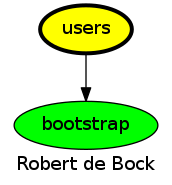
Here is an overview of related roles:
Compatibility
-------------
This role has been tested against the following distributions and Ansible version:
|distribution|ansible 2.7|ansible 2.8|ansible devel|
|------------|-----------|-----------|-------------|
|alpine-edge*|yes|yes|yes*|
|alpine-latest|yes|yes|yes*|
|archlinux|yes|yes|yes*|
|centos-6|yes|yes|yes*|
|centos-latest|yes|yes|yes*|
|debian-stable|yes|yes|yes*|
|debian-unstable*|yes|yes|yes*|
|fedora-latest|yes|yes|yes*|
|fedora-rawhide*|yes|yes|yes*|
|opensuse-leap|yes|yes|yes*|
|ubuntu-devel*|yes|yes|yes*|
|ubuntu-latest|yes|yes|yes*|
|ubuntu-rolling|yes|yes|yes*|
A single star means the build may fail, it's marked as an experimental build.
Testing
-------
[Unit tests](https://travis-ci.org/robertdebock/ansible-role-users) are done on every commit and periodically.
If you find issues, please register them in [GitHub](https://github.com/robertdebock/ansible-role-users/issues)
To test this role locally please use [Molecule](https://github.com/ansible/molecule):
```
pip install molecule
molecule test
```
To test on Amazon EC2, configure [~/.aws/credentials](https://docs.aws.amazon.com/sdk-for-java/v1/developer-guide/credentials.html) and set a region using `export AWS_REGION=eu-central-1` before running `molecule test --scenario-name ec2`.
There are many specific scenarios available, please have a look in the `molecule/` directory.
License
-------
Apache-2.0
Author Information
------------------
[Robert de Bock](https://robertdebock.nl/)
The purpose of this role is to add users and groups on your system.
Example Playbook
----------------
This example is taken from `molecule/resources/playbook.yml`:
```yaml
---
- name: Converge
hosts: all
become: yes
gather_facts: yes
vars:
users_group_list:
- name: robertdb
gid: 1024
- name: users
- name: notgroup
state: absent
users_user_list:
- name: root
cron_allow: yes
- name: robertdb
comment: Robert de Bock
uid: 1024
group: robertdb
groups: users
cron_allow: yes
sudo_options: "ALL=(ALL) NOPASSWD: ALL"
authorized_key: "ssh-rsa ABC123"
- name: notuser
state: absent
- name: keyuser
manage_ssh_key: yes
- name: privkeyuser
manage_ssh_key: yes
copy_private_key: yes
- name: multiplekeys
authorized_keys:
- "ssh-rsa ABC1234"
- "ssh-rsa ABC12345"
- name: mixedkeys
authorized_key: "ssh-rsa ABC123456"
authorized_keys:
- "ssh-rsa ABC1234567"
- "ssh-rsa ABC12345678"
roles:
- robertdebock.users
```
The machine you are running this on, may need to be prepared.
```yaml
---
- name: Prepare
hosts: all
gather_facts: no
become: yes
roles:
- robertdebock.bootstrap
```
Also see a [full explanation and example](https://robertdebock.nl/how-to-use-these-roles.html) on how to use these roles.
Role Variables
--------------
These variables are set in `defaults/main.yml`:
```yaml
---
# defaults file for users
# The location to store ssh keys for user
users_ssh_key_directory: ssh_keys
# The default shell if not overwritten.
users_shell: /bin/bash
# manage cron permissions via /etc/cron.allow
users_cron_allow: true
# A list of groups and properties.
# users_group_list:
# - name: robertdb
# gid: 1024
# - name: notgroup
# state: absent
# A list of users and properties.
# users_user_list:
# - name: root
# cron_allow: yes
# - name: robertdb
# comment: Robert de Bock
# uid: 1024
# group: robertdb
# groups: users,wheel
# cron_allow: yes
# sudo_options: "ALL=(ALL) NOPASSWD: ALL"
# authorized_key: "ssh-rsa AAAAB3NzaC1yc2EAAAADAQABAAABAQCWswOogkZz/ihQA0lENCwDwSzmtmBWtFwzIzDlfa+eb4rBt6rZBg7enKeMqYtStI/NDneBwZUFBDIMu5zJTbvg7A60/WDhWXZmU21tZnm8K7KREFYOUndc6h//QHig6IIaIwwBZHF1NgXLtZ0qrUUlNU5JSEhDJsObMlPHtE4vFP8twPnfc7hxAnYma5+knU6qTMCDvhBE5tGJdor4UGeAhu+SwSVDloYtt1vGTmnFn8M/OD/fRMksusPefxyshJ37jpB4jY/Z9vzaNHwcj33prwl1b/xRfxr/+KRJsyq+ZKs9u2TVw9g4p+XLdfDtzZ8thR2P3x3MFrZOdFmCbo/5"
# authorized_keys:
# - "ssh-rsa AAAAB3NzaC1yc2EAAAADAQABAAABAQCWswOogkZz/ihQA0lENCwDwSzmtmBWtFwzIzDlfa+eb4rBt6rZBg7enKeMqYtStI/NDneBwZUFBDIMu5zJTbvg7A60/WDhWXZmU21tZnm8K7KREFYOUndc6h//QHig6IIaIwwBZHF1NgXLtZ0qrUUlNU5JSEhDJsObMlPHtE4vFP8twPnfc7hxAnYma5+knU6qTMCDvhBE5tGJdor4UGeAhu+SwSVDloYtt1vGTmnFn8M/OD/fRMksusPefxyshJ37jpB4jY/Z9vzaNHwcj33prwl1b/xRfxr/+KRJsyq+ZKs9u2TVw9g4p+XLdfDtzZ8thR2P3x3MFrZOdFmCbo/5"
# copy_private_key: yes
# - name: notuser
# state: absent
# - name: keyuser
# manage_ssh_key: yes
# - name: specificshell
# shell: "/bin/ksh"
```
Requirements
------------
- Access to a repository containing packages, likely on the internet.
- A recent version of Ansible. (Tests run on the current, previous and next release of Ansible.)
The following roles can be installed to ensure all requirements are met, using `ansible-galaxy install -r requirements.yml`:
```yaml
---
- robertdebock.bootstrap
```
Context
-------
This role is a part of many compatible roles. Have a look at [the documentation of these roles](https://robertdebock.nl/) for further information.
Here is an overview of related roles:

Compatibility
-------------
This role has been tested against the following distributions and Ansible version:
|distribution|ansible 2.7|ansible 2.8|ansible devel|
|------------|-----------|-----------|-------------|
|alpine-edge*|yes|yes|yes*|
|alpine-latest|yes|yes|yes*|
|archlinux|yes|yes|yes*|
|centos-6|yes|yes|yes*|
|centos-latest|yes|yes|yes*|
|debian-stable|yes|yes|yes*|
|debian-unstable*|yes|yes|yes*|
|fedora-latest|yes|yes|yes*|
|fedora-rawhide*|yes|yes|yes*|
|opensuse-leap|yes|yes|yes*|
|ubuntu-devel*|yes|yes|yes*|
|ubuntu-latest|yes|yes|yes*|
|ubuntu-rolling|yes|yes|yes*|
A single star means the build may fail, it's marked as an experimental build.
Testing
-------
[Unit tests](https://travis-ci.org/robertdebock/ansible-role-users) are done on every commit and periodically.
If you find issues, please register them in [GitHub](https://github.com/robertdebock/ansible-role-users/issues)
To test this role locally please use [Molecule](https://github.com/ansible/molecule):
```
pip install molecule
molecule test
```
To test on Amazon EC2, configure [~/.aws/credentials](https://docs.aws.amazon.com/sdk-for-java/v1/developer-guide/credentials.html) and set a region using `export AWS_REGION=eu-central-1` before running `molecule test --scenario-name ec2`.
There are many specific scenarios available, please have a look in the `molecule/` directory.
License
-------
Apache-2.0
Author Information
------------------
[Robert de Bock](https://robertdebock.nl/)