 bed3e93cd6
|
||
|---|---|---|
| .. | ||
| .github | ||
| defaults | ||
| meta | ||
| molecule/default | ||
| tasks | ||
| templates | ||
| vars | ||
| .ansible-lint | ||
| .gitignore | ||
| .yamllint | ||
| CODE_OF_CONDUCT.md | ||
| CONTRIBUTING.md | ||
| LICENSE | ||
| README.md | ||
| SECURITY.md | ||
| requirements.yml | ||
| tox.ini | ||
README.md
users
The purpose of this role is to add users and groups on your system.
| GitHub | GitLab | Quality | Downloads | Version |
|---|---|---|---|---|
 |
 |
 |
 |
 |
Example Playbook
This example is taken from molecule/default/converge.yml and is tested on each push, pull request and release.
---
- name: Converge
  hosts: all
  become: yes
  gather_facts: yes

  roles:
    - role: robertdebock.users
      # You can create groups:
      users_group_list:
        - name: robertdb
          gid: 1024
        - name: users
          # You can also remove groups.
        - name: notgroup
          state: absent
          # A system group is also possible.
        - name: systemgroup
          system: yes

      # You can create users.
      users_user_list:
        - name: root
          cron_allow: yes
          # You can remove authorized keys.
          unauthorized_keys:
            - "ssh-rsa XYZYX54321"
        - name: robertdb
          comment: Robert de Bock
          uid: 1024
          # The `group` and `groups` listed here should exist.
          group: robertdb
          # groups: A comma separated string of groups, i.e.:
          # groups: users,wheel
          groups: users
          cron_allow: yes
          sudo_options: "ALL=(ALL) NOPASSWD: ALL"
          # Adding an authorized key.
          authorized_keys:
            - "ssh-rsa ABC123"
          # EPOCH timestamp when an account should expire.
          # Typically a positive value like: `1641971487`.
          # The value `-1` removes the expiry time.
          expires: -1
          password_validity_days: 9
          # Test username with dots
        - name: robert.d.b
          comment: Robert de Bock with dots in username
          uid: 1025
          # The `group` and `groups` listed here should exist.
          group: robertdb
          # groups: A comma separated string of groups, i.e.:
          # groups: users,wheel
          groups: users
          cron_allow: yes
          sudo_options: "ALL=(ALL) NOPASSWD: ALL"
          # Adding an authorized key.
          authorized_keys:
            - "ssh-rsa ABC123"
          # EPOCH timestamp when an account should expire.
          # Typically a positive value like: `1641971487`.
          # The value `-1` removes the expiry time.
          expires: -1
          password_validity_days: 9
        # Here a user is removed.
        - name: notuser
          state: absent
        - name: keyuser
          manage_ssh_key: yes
        - name: privkeyuser
          # This user will have ssh-keys generated.
          manage_ssh_key: yes
          copy_private_key: yes
        - name: multiplekeys
          authorized_keys:
            - "ssh-rsa ABC1234"
            - "ssh-rsa ABC12345"
        - name: passuser
          # You can set a password. (Hashed and salted.)
          password: "$6$mysecretsalt$qJbapG68nyRab3gxvKWPUcs2g3t0oMHSHMnSKecYNpSi3CuZm.GbBqXO8BE6EI6P1JUefhA0qvD7b5LSh./PU1"
          update_password: on_create
        - name: remotekey
          authorized_keys:
            # You can also download a public key from a URL.
            - "https://raw.githubusercontent.com/shaanr/smdb/master/file.pub"
        - name: systemuser
          system: yes
        - name: multisudo
          # An account that can run just a few commands without a password.
          sudo_options:
            - "ALL= NOPASSWD: /usr/bin/systemctl restart httpd"
            - "ALL= NOPASSWD: /usr/bin/systemctl start httpd"
            - "ALL= NOPASSWD: /usr/bin/systemctl stop httpd"
The machine needs to be prepared. In CI this is done using molecule/default/prepare.yml:
---
- name: Prepare
  hosts: all
  gather_facts: no
  become: yes

  roles:
    - role: robertdebock.bootstrap
    - role: robertdebock.core_dependencies

  tasks:
    - name: Set authorized keys for root
      ansible.posix.authorized_key:
        user: root
        state: present
        key: "ssh-rsa XYZYX54321"
Also see a full explanation and example on how to use these roles.
Role Variables
The default values for the variables are set in defaults/main.yml:
---
# defaults file for users

# The location to store ssh keys for user
users_ssh_key_directory: ssh_keys

# The default shell if not overwritten.
users_shell: /bin/bash

# manage cron permissions via /etc/cron.allow
users_cron_allow: yes

# should homedirectories be created?
users_create_home: yes
Requirements
- pip packages listed in requirements.txt.
Status of used roles
The following roles are used to prepare a system. You can prepare your system in another way.
| Requirement | GitHub | GitLab |
|---|---|---|
| robertdebock.bootstrap |  |
 |
| robertdebock.core_dependencies |  |
 |
Context
This role is a part of many compatible roles. Have a look at the documentation of these roles for further information.
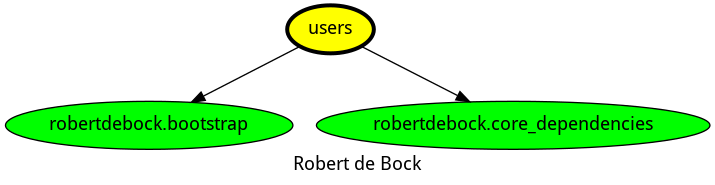
Here is an overview of related roles:
Compatibility
This role has been tested on these container images:
| container | tags |
|---|---|
| alpine | all |
| amazon | Candidate |
| el | 8 |
| debian | all |
| fedora | all |
| opensuse | all |
| ubuntu | all |
The minimum version of Ansible required is 2.10, tests have been done to:
- The previous version.
- The current version.
- The development version.
If you find issues, please register them in GitHub
License
Apache-2.0
Author Information
Please consider sponsoring me.