 5350b64f87
|
||
|---|---|---|
| .. | ||
| .github | ||
| defaults | ||
| meta | ||
| molecule | ||
| tasks | ||
| templates | ||
| vars | ||
| .gitignore | ||
| .travis.yml | ||
| .yamllint | ||
| CODE_OF_CONDUCT.md | ||
| CONTRIBUTING.md | ||
| LICENSE | ||
| PULL_REQUEST_TEMPLATE.md | ||
| README.md | ||
| SECURITY.md | ||
| requirements.yml | ||
README.md
users


The purpose of this role is to add users and groups on your system.
Example Playbook
This example is taken from molecule/resources/playbook.yml:
---
- name: Converge
  hosts: all
  become: yes
  gather_facts: yes

  vars:
    users_group_list:
      - name: robertdb
        gid: 1024
      - name: users
      - name: notgroup
        state: absent

    users_user_list:
      - name: root
        cron_allow: yes
      - name: robertdb
        comment: Robert de Bock
        uid: 1024
        group: robertdb
        groups: users
        cron_allow: yes
        sudo_options: "ALL=(ALL) NOPASSWD: ALL"
        authorized_key: "ssh-rsa ABC123"
      - name: notuser
        state: absent
      - name: keyuser
        manage_ssh_key: yes
      - name: privkeyuser
        manage_ssh_key: yes
        copy_private_key: yes
      - name: multiplekeys
        authorized_keys:
          - "ssh-rsa ABC1234"
          - "ssh-rsa ABC12345"
      - name: mixedkeys
        authorized_key: "ssh-rsa ABC123456"
        authorized_keys:
          - "ssh-rsa ABC1234567"
          - "ssh-rsa ABC12345678"

  roles:
    - robertdebock.users
The machine you are running this on, may need to be prepared.
---
- name: Prepare
  hosts: all
  gather_facts: no
  become: yes

  roles:
    - robertdebock.bootstrap
Also see a full explanation and example on how to use these roles.
Role Variables
These variables are set in defaults/main.yml:
---
# defaults file for users

# The location to store ssh keys for user
users_ssh_key_directory: ssh_keys

# The default shell if not overwritten.
users_shell: /bin/bash

# manage cron permissions via /etc/cron.allow
users_cron_allow: true

# A list of groups and properties.
# users_group_list:
#   - name: robertdb
#     gid: 1024
#   - name: notgroup
#     state: absent

# A list of users and properties.
# users_user_list:
#   - name: root
#     cron_allow: yes
#   - name: robertdb
#     comment: Robert de Bock
#     uid: 1024
#     group: robertdb
#     groups: users,wheel
#     cron_allow: yes
#     sudo_options: "ALL=(ALL) NOPASSWD: ALL"
#     authorized_key: "ssh-rsa AAAAB3NzaC1yc2EAAAADAQABAAABAQCWswOogkZz/ihQA0lENCwDwSzmtmBWtFwzIzDlfa+eb4rBt6rZBg7enKeMqYtStI/NDneBwZUFBDIMu5zJTbvg7A60/WDhWXZmU21tZnm8K7KREFYOUndc6h//QHig6IIaIwwBZHF1NgXLtZ0qrUUlNU5JSEhDJsObMlPHtE4vFP8twPnfc7hxAnYma5+knU6qTMCDvhBE5tGJdor4UGeAhu+SwSVDloYtt1vGTmnFn8M/OD/fRMksusPefxyshJ37jpB4jY/Z9vzaNHwcj33prwl1b/xRfxr/+KRJsyq+ZKs9u2TVw9g4p+XLdfDtzZ8thR2P3x3MFrZOdFmCbo/5"
#      authorized_keys:
#        - "ssh-rsa AAAAB3NzaC1yc2EAAAADAQABAAABAQCWswOogkZz/ihQA0lENCwDwSzmtmBWtFwzIzDlfa+eb4rBt6rZBg7enKeMqYtStI/NDneBwZUFBDIMu5zJTbvg7A60/WDhWXZmU21tZnm8K7KREFYOUndc6h//QHig6IIaIwwBZHF1NgXLtZ0qrUUlNU5JSEhDJsObMlPHtE4vFP8twPnfc7hxAnYma5+knU6qTMCDvhBE5tGJdor4UGeAhu+SwSVDloYtt1vGTmnFn8M/OD/fRMksusPefxyshJ37jpB4jY/Z9vzaNHwcj33prwl1b/xRfxr/+KRJsyq+ZKs9u2TVw9g4p+XLdfDtzZ8thR2P3x3MFrZOdFmCbo/5"
#     copy_private_key: yes
#   - name: notuser
#     state: absent
#   - name: keyuser
#     manage_ssh_key: yes
#   - name: specificshell
#     shell: "/bin/ksh"
Requirements
- Access to a repository containing packages, likely on the internet.
- A recent version of Ansible. (Tests run on the current, previous and next release of Ansible.)
The following roles can be installed to ensure all requirements are met, using ansible-galaxy install -r requirements.yml:
---
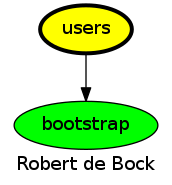
- robertdebock.bootstrap
Context
This role is a part of many compatible roles. Have a look at the documentation of these roles for further information.
Here is an overview of related roles:
Compatibility
This role has been tested against the following distributions and Ansible version:
| distribution | ansible 2.7 | ansible 2.8 | ansible devel |
|---|---|---|---|
| alpine-edge* | yes | yes | yes* |
| alpine-latest | yes | yes | yes* |
| archlinux | yes | yes | yes* |
| centos-6 | yes | yes | yes* |
| centos-latest | yes | yes | yes* |
| debian-stable | yes | yes | yes* |
| debian-unstable* | yes | yes | yes* |
| fedora-latest | yes | yes | yes* |
| fedora-rawhide* | yes | yes | yes* |
| opensuse-leap | yes | yes | yes* |
| ubuntu-devel* | yes | yes | yes* |
| ubuntu-latest | yes | yes | yes* |
| ubuntu-rolling | yes | yes | yes* |
A single star means the build may fail, it's marked as an experimental build.
Testing
Unit tests are done on every commit and periodically.
If you find issues, please register them in GitHub
To test this role locally please use Molecule:
pip install molecule
molecule test
To test on Amazon EC2, configure ~/.aws/credentials and set a region using export AWS_REGION=eu-central-1 before running molecule test --scenario-name ec2.
There are many specific scenarios available, please have a look in the molecule/ directory.
License
Apache-2.0