172 lines
4.6 KiB
Markdown
172 lines
4.6 KiB
Markdown
python_pip
|
|
=========
|
|
|
|
<img src="https://docs.ansible.com/ansible-tower/3.2.4/html_ja/installandreference/_static/images/logo_invert.png" width="10%" height="10%" alt="Ansible logo" align="right"/>
|
|
<a href="https://travis-ci.org/robertdebock/ansible-role-python_pip"> <img src="https://travis-ci.org/robertdebock/ansible-role-python_pip.svg?branch=master" alt="Build status"/></a> <img src="https://img.shields.io/ansible/role/d/42440"/> <img src="https://img.shields.io/ansible/quality/42440"/>
|
|
|
|
Install pythons pip on your system.
|
|
|
|
Example Playbook
|
|
----------------
|
|
|
|
This example is taken from `molecule/resources/playbook.yml` and is tested on each push, pull request and release.
|
|
```yaml
|
|
---
|
|
- name: Converge
|
|
hosts: all
|
|
become: yes
|
|
gather_facts: yes
|
|
|
|
roles:
|
|
- robertdebock.python_pip
|
|
```
|
|
|
|
The machine you are running this on, may need to be prepared, I use this playbook to ensure everything is in place to let the role work.
|
|
```yaml
|
|
---
|
|
- name: Prepare
|
|
hosts: all
|
|
gather_facts: no
|
|
become: yes
|
|
|
|
roles:
|
|
- robertdebock.bootstrap
|
|
- robertdebock.epel
|
|
- robertdebock.buildtools
|
|
```
|
|
|
|
After running this role, this playbook runs to verify that everything works, this may be a good example how you can use this role.
|
|
```yaml
|
|
---
|
|
- name: Verify
|
|
hosts: all
|
|
become: yes
|
|
gather_facts: yes
|
|
|
|
tasks:
|
|
- name: install pip module
|
|
pip:
|
|
name: ansible
|
|
state: present
|
|
```
|
|
```
|
|
|
|
Also see a [full explanation and example](https://robertdebock.nl/how-to-use-these-roles.html) on how to use these roles.
|
|
|
|
Role Variables
|
|
--------------
|
|
|
|
These variables are set in `defaults/main.yml`:
|
|
```yaml
|
|
---
|
|
# defaults file for python_pip
|
|
# By default no modules should be installed.
|
|
python_pip_modules: []
|
|
|
|
# Connect to a (pypi) proxy by setting this variable.
|
|
# python_pip_proxy: "https://user:password@proxy:8443/artifactory/pypi/pypi-virtual/simple"
|
|
```
|
|
|
|
Requirements
|
|
------------
|
|
|
|
- Access to a repository containing packages, likely on the internet.
|
|
- A recent version of Ansible. (Tests run on the current, previous and next release of Ansible.)
|
|
|
|
The following roles can be installed to ensure all requirements are met, using `ansible-galaxy install -r requirements.yml`:
|
|
|
|
```yaml
|
|
---
|
|
- robertdebock.bootstrap
|
|
- robertdebock.buildtools
|
|
- robertdebock.epel
|
|
|
|
```
|
|
|
|
Context
|
|
-------
|
|
|
|
This role is a part of many compatible roles. Have a look at [the documentation of these roles](https://robertdebock.nl/) for further information.
|
|
|
|
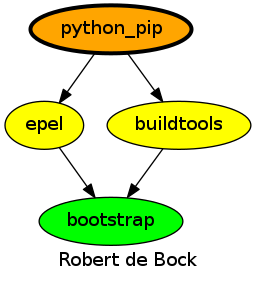
Here is an overview of related roles:
|
|
|
|
|
|
|
|
Compatibility
|
|
-------------
|
|
|
|
This role has been tested on these [container images](https://hub.docker.com/):
|
|
|
|
|container|tags|
|
|
|---------|----|
|
|
|alpine|all|
|
|
|archlinux|all|
|
|
|debian|all|
|
|
|el|7, 8|
|
|
|fedora|all|
|
|
|opensuse|all|
|
|
|ubuntu|artful, bionic|
|
|
|
|
The minimum version of Ansible required is 2.8 but tests have been done to:
|
|
|
|
- The previous version, on version lower.
|
|
- The current version.
|
|
- The development version.
|
|
|
|
Exceptions
|
|
----------
|
|
|
|
Some variarations of the build matrix do not work. These are the variations and reasons why the build won't work:
|
|
|
|
| variation | reason |
|
|
|---------------------------|------------------------|
|
|
| amazonline:1 | ImportError: No module named pkg_resources |
|
|
| amazonline | ImportError: No module named pkg_resources |
|
|
|
|
|
|
Testing
|
|
-------
|
|
|
|
[Unit tests](https://travis-ci.org/robertdebock/ansible-role-python_pip) are done on every commit, pull request, release and periodically.
|
|
|
|
If you find issues, please register them in [GitHub](https://github.com/robertdebock/ansible-role-python_pip/issues)
|
|
|
|
Testing is done using [Tox](https://tox.readthedocs.io/en/latest/) and [Molecule](https://github.com/ansible/molecule):
|
|
|
|
[Tox](https://tox.readthedocs.io/en/latest/) tests multiple ansible versions.
|
|
[Molecule](https://github.com/ansible/molecule) tests multiple distributions.
|
|
|
|
To test using the defaults (any installed ansible version, namespace: `robertdebock`, image: `fedora`, tag: `latest`):
|
|
|
|
```
|
|
molecule test
|
|
|
|
# Or select a specific image:
|
|
image=ubuntu molecule test
|
|
# Or select a specific image and a specific tag:
|
|
image="debian" tag="stable" tox
|
|
```
|
|
|
|
Or you can test multiple versions of Ansible, and select images:
|
|
Tox allows multiple versions of Ansible to be tested. To run the default (namespace: `robertdebock`, image: `fedora`, tag: `latest`) tests:
|
|
|
|
```
|
|
tox
|
|
|
|
# To run CentOS (namespace: `robertdebock`, tag: `latest`)
|
|
image="centos" tox
|
|
# Or customize more:
|
|
image="debian" tag="stable" tox
|
|
```
|
|
|
|
License
|
|
-------
|
|
|
|
Apache-2.0
|
|
|
|
|
|
Author Information
|
|
------------------
|
|
|
|
[Robert de Bock](https://robertdebock.nl/)
|